Discover how SaaS startups can implement effective content marketing strategies with a lean budget of $500/mo.
March 19, 2026
Over the past three years, we’ve spoken with +150 SaaS startups to talk about content marketing, AI, and their strategy. Of course, they often operate with lean budgets, yet content marketing remains a critical driver for growth, lead generation, and particularly brand authority. What we told them ? You don't need a massive budget to create impactful content.
Let's see how to build a powerful content marketing strategy for your SaaS startup with a budget of just $500 per month, focusing on maximizing every dollar for tangible results. Of course, this budget can vary depending on how much content you want to generate. But $500/month is a good starting point for the discussion if you want to build something solid.
Before spending a dime, a deep understanding of your target audience is paramount. This involves more than just demographics; it requires delving into their psychographics, pain points, aspirations, and how your SaaS solution directly addresses their challenges. Every piece of content you make should answer the pains they have and give them value.
So how to do it ? Here is what we tell our customers :
>Customer interviews (free) : Schedule 15-30 minute calls with existing happy customers. Ask open-ended questions about their daily challenges, how they discovered your solution, what they love most, and what problems they still face. Record (with permission) and transcribe these for keyword and topic ideas.
>Surveys (Low-cost/Free) : Use tools like Google Forms or SurveyMonkey (free tiers) to gather quantitative data. Ask about their biggest frustrations, desired features, and preferred content formats. Distribute via email lists or social media.
>Competitor audience analysis (free) : Examine your competitors' blog comments, social media engagement, and review sites (G2, Capterra...). What questions are their customers asking? What complaints are common? This reveals content gaps you can fill.
>Support tickets & sales calls (internal data) : Analyze your own support logs and sales call recordings. These are goldmines for understanding common pain points, objections, and frequently asked questions that your content can address directly.
By focusing on a specific niche within your broader market (e.g., "project management software for remote design teams" instead of just "project management software"), you can tailor your content to resonate deeply with a highly engaged segment. This leads to higher conversion rates and a more efficient use of resources. For example, instead of writing about general project management, focus on "Agile workflows for distributed design teams" or "Tools for asynchronous collaboration in creative agencies." This specificity attracts highly qualified leads and it will be easier for you to set up a marketing strategy that builds trust.
We analyzed what our users were doing and set up more than 100 campaigns, leveraging the right tools can significantly amplify your content efforts without draining your budget. To start, prioritize those that offer robust free tiers or are inherently low-cost:
>Google Analytics & Search Console (Free): These are indispensable for understanding your website's performance. Use Google Analytics to track user behavior (e.g., which blog posts have the longest time on page), identify top-performing content, and understand traffic sources. Google Search Console provides insights into how your site performs in Google Search results, revealing actual search queries, indexing status, and potential SEO issues. For a SaaS startup, this means identifying which features or problems your audience searches for most, allowing you to create content that directly answers those queries.
>AnswerThePublic/AlsoAsked (Free/Freemium tiers) : These tools visualize common questions and related queries around a topic. By inputting your core keywords (e.g., "SaaS onboarding best practices"), you can uncover the exact questions your audience is asking (e.g., "how to reduce SaaS churn onboarding"). This directly informs your content topics and ensures you're addressing real user needs, making your content highly relevant and searchable.
>Canva (Free/Pro around $10/mo): You probably knows it, a user-friendly graphic design platform that allows you to create professional-looking visuals without needing a dedicated designer. Use it for blog headers, social media graphics, simple infographics (e.g., a flowchart of your SaaS workflow), presentation slides, and even basic video edits. Its extensive library of templates and drag-and-drop interface makes high-quality visual content accessible on a tight budget, enhancing content appeal and shareability.
>Free AI writing assistants (Free): While not a replacement for human creativity, AI tools can be powerful assistants. Use them for brainstorming content ideas (e.g., "10 blog post ideas for SaaS sales enablement"), generating outlines, drafting initial paragraphs, rephrasing sentences for clarity, or even optimizing existing content for conciseness. They can significantly speed up the content creation process, allowing you to produce more with less effort, freeing up your time for strategic thinking.
We talk about this with every customer we have, this strategy focuses on creating one comprehensive, authoritative piece of content (a "pillar") and then breaking it down into numerous smaller, digestible pieces. This maximizes the value of your research and writing efforts, ensuring longevity and broad reach.
What to do :
>Create a comprehensive pillar page (Monthly Goal): Once a month, develop a long-form, in-depth article (5,000+ words), guide, or whitepaper on a core topic relevant to your SaaS. This pillar page should cover the topic exhaustively, establishing your authority and serving as a central hub for related content. For example, if your SaaS is a CRM, a pillar page could be "The definitive guide to CRM Implementation for small businesses." This piece is designed to rank for broad, high-volume keywords and attract significant organic traffic.
>Repurpose into blog posts (Weekly/Bi-weekly): Break down specific sections or sub-topics of your pillar page into shorter, focused blog posts. For example, from the CRM pillar, you could create blog posts like "5 essential steps for CRM data migration," "Choosing the right CRM for your sales team," or "Integrating your CRM with marketing automation." These smaller posts can target more specific, mid-tail keywords and drive traffic back to your main pillar page through internal linking, reinforcing its authority.
>Generate social media snippets (Daily/Weekly): Extract key statistics, compelling quotes, actionable tips, or short video clips from your pillar content. Transform these into engaging posts for platforms like LinkedIn, Twitter, Instagram, and Facebook. For instance, a quote about a CRM's impact on sales efficiency can become a LinkedIn post with a link to the full blog post. This provides a constant stream of valuable content for your social channels and drives traffic to your longer-form content. By the way, here are the new updates of the : LinkedIn algorithm.
>Develop Email Newsletters (Bi-weekly/Monthly): Summarize the core insights of your pillar content or related blog posts into engaging email newsletters. Use these to nurture your audience, keep them informed, and direct them back to your website for the full content. This reinforces your expertise and maintains audience engagement, turning subscribers into loyal readers and potential customers.
>Design Infographics (Quarterly): Complex data or processes from your pillar content can be visually represented in infographics using tools like Canva. For example, a step-by-step guide to CRM setup can be an infographic. Infographics are highly shareable and can effectively communicate dense information in an easily digestible format, attracting backlinks and social shares, further extending your content's reach.
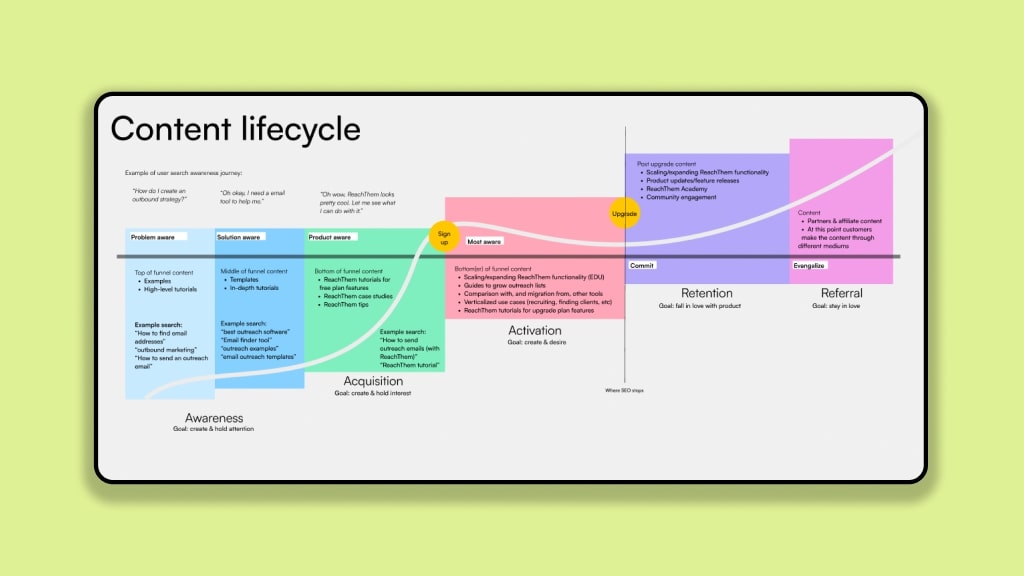
If you want to go further, you can also see how we help our customers create a system, what we call the content growth cycle.
For lean startups, targeting long-tail keywords is a smart play. These phrases have lower search volume but significantly higher purchase intent and less competition, making them easier to rank for and more likely to convert. This is where your $500 budget can shine.
Focused long-tail keyword research (Ongoing): Beyond general tools, use Google Autocomplete, the "People Also Ask" section, and related searches to uncover highly specific, multi-word phrases. For example, if your SaaS offers email marketing, instead of just "email marketing," look for "best email marketing software for small e-commerce" or "how to automate welcome emails for new subscribers." Analyze what your competitors are ranking for and identify gaps. Tools like Ubersuggest (free tier) or Keyword Sheeter can also provide a wealth of long-tail ideas by scraping autocomplete suggestions. Or easier, just use the Tellem AI chat that is connected to SEO data ;)
Meticulous on-page SEO optimization (Per article): Ensure every piece of content is meticulously optimized for its target long-tail keyword. This includes placing the keyword naturally in the title tag, H1 heading, meta description, and the first paragraph. Optimize image alt text with descriptive keywords for accessibility and search engine understanding.
Check out our SEO checklist for new founders for more.
If you want to set up a system with automations for working your content marketing, juste use Tellem AI for all of this ;). Book a free consulting session here

Drive more revenue
with your AI marketing team


.svg)
